







Valve’s $1,000 Steam Machine is out, and I’ve been playing games on it and testing it out for the last two weeks or so. Right after Valve sent me a 2TB Steam Machine, I quickly loaded up a ton of games on the device from my library and ran it through its paces.
For these tests, I left the Steam Machine’s default settings on. That means these games were running at 1080p and then upscaled to my 4K TV. Unless otherwise noted, I didn’t change the resolution for games. Likewise, unless noted, I left the games running at whatever they defaulted to when booted up on the Steam Machine. For some games that defaulted to Steam Deck settings, this meant I could up the visual sliders a bit and still have a great experience.
Overall, my tests were built around the idea of someone buying a Steam Machine and treating it like a console. Just plugging it in, downloading games, and playing with minimal amount of tinkering or tweaking. As for the games I picked, it was a mix of new and old, 3D and 2D, indie and AAA, and some random stuff that I was just curious about playing on the Steam Machine. I’ll likely update this post in the future with more games, but for now here we go!
Cyberpunk 2077
This was one of the first games I tried and I was impressed. I even bumped up the settings, and it ran wonderfully. Runs at 60 FPS and looks sharp to my eyes. Even had some light RT on. It should be noted that this was running at 1080p upscaled to my TV. When I started increasing resolution, things started to get less stable. But out of the box and using the Steam Machine’s default settings, a totally playable version of Cyberpunk 2077.
Mouse: P.I. for Hire
The only tweak I had to make to this excellent black-and-white FPS was to increase the stick sensitivity. Other than that, Mouse: P.I. runs great at 60 FPS on Steam Machine and looks super sharp with default options.
Left 4 Dead 2
This game runs on basically anything in 2026. And yup, it works great on the Steam Machine. Anybody want to play Left 4 Dead 2? I love this game.

Borderlands 4
Default experience was an ugly mess. Probably one of the worst out-of-the-box experiences I had. But once I turned up some settings and tweaked some FSR stuff, it looked and played…fine. Compared to my PS5 Pro, it wasn’t that far off, but considering the Steam Machine is $1,000 and new and the Pro is cheaper and older, that’s not a huge compliment.
Hades 2
The kind of game the Steam Machine handles effortlessly. Felt great. Ran great. Looked great at default settings. Hades 1 ran well, too. Consider that a bonus game on this list. A treat for you.
Silent Hill 2
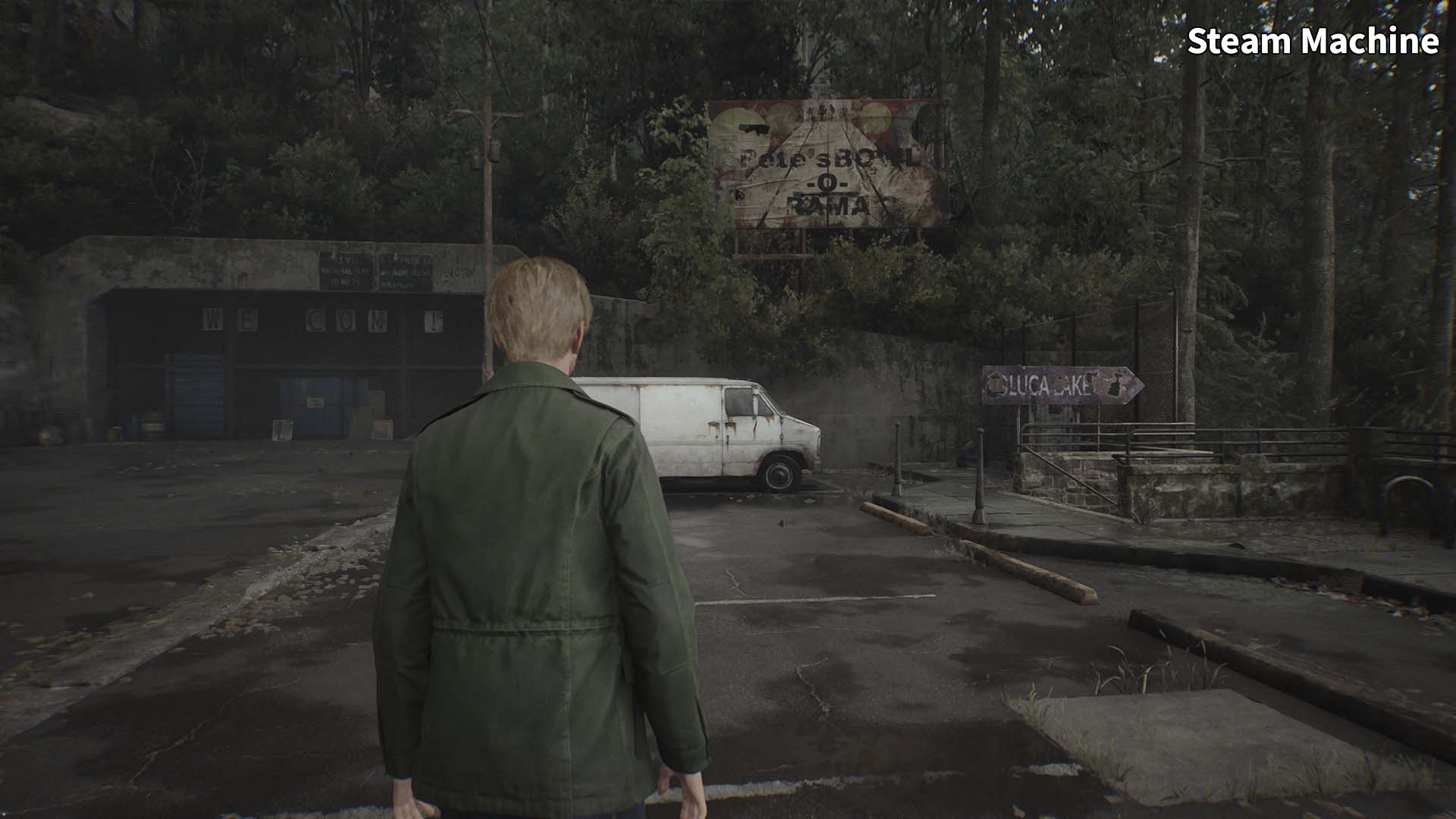
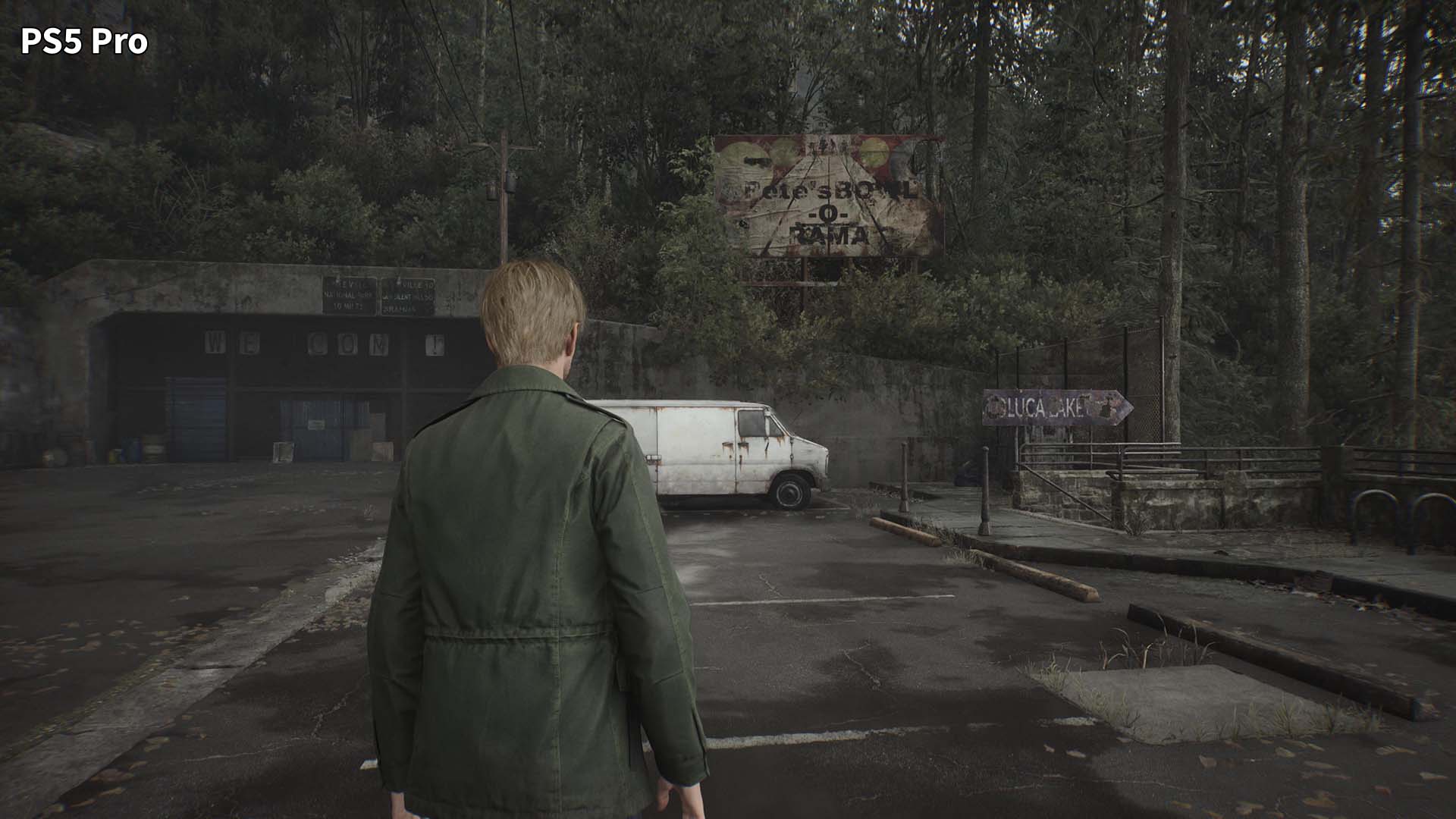
This is still kind of a messy-looking game on PS5 (even my PS5 Pro), so I wasn’t surprised to find the Steam Machine version looking even worse. If you squint, maybe, but I’d avoid it.
Doom: The Dark Ages
Id Tech is a magical engine that can seemingly scale to any device, and this is no different. Dark Ages looks nice and plays perfectly on the Steam Machine, though it’s a bit blurrier than I’d like on the default settings. But you can tune that up and still have a great time. What idiot would lay off the people behind this engine?
Megabonk
This ran perfectly on Steam Deck, so not shocked to say it runs just as well on Steam Machine while looking even better. Accidentally played more of this than I needed to because…Megabonk is great, man, and this is a fantastic way to play it. And also a very expensive way to play it.


Spider-Man 2
Default experience was fine and very playable, but to get it looking better and sharper, I upped the resolution to 1440p and did some frame-gen. The end result was comparable to PS5 in screenshots, but in motion not so much, with Steam Machine looking worse.
Windrose
Default settings didn’t run great, and turning on frame generation added too much input lag. However, tweaking settings to medium helped a lot. But this still never felt great and tuning visuals down more looked too messy for me, so not one I’ll be playing on Steam Machine.
Overwatch
Wow. I didn’t expect this to be the game that floored me. But loading this up on Steam Machine, the default experience is fantastic. On top of that, I was able to up the visuals and resolution a lot, and it still played great. And bonus: It’s an online MP game that works with SteamOS. Side by side with PS5, it’s hard to spot the difference on this one.
Grand Theft Auto V
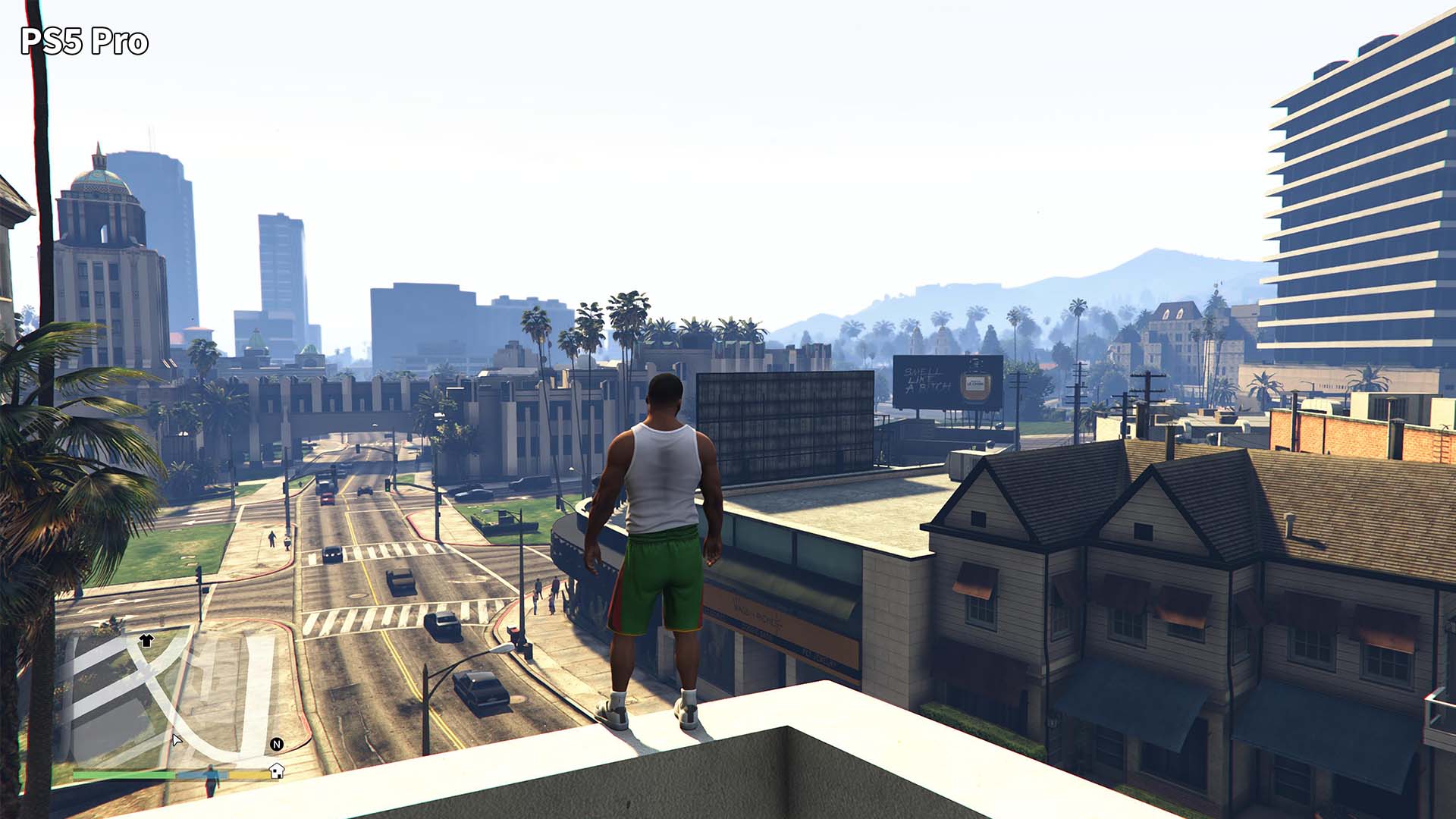
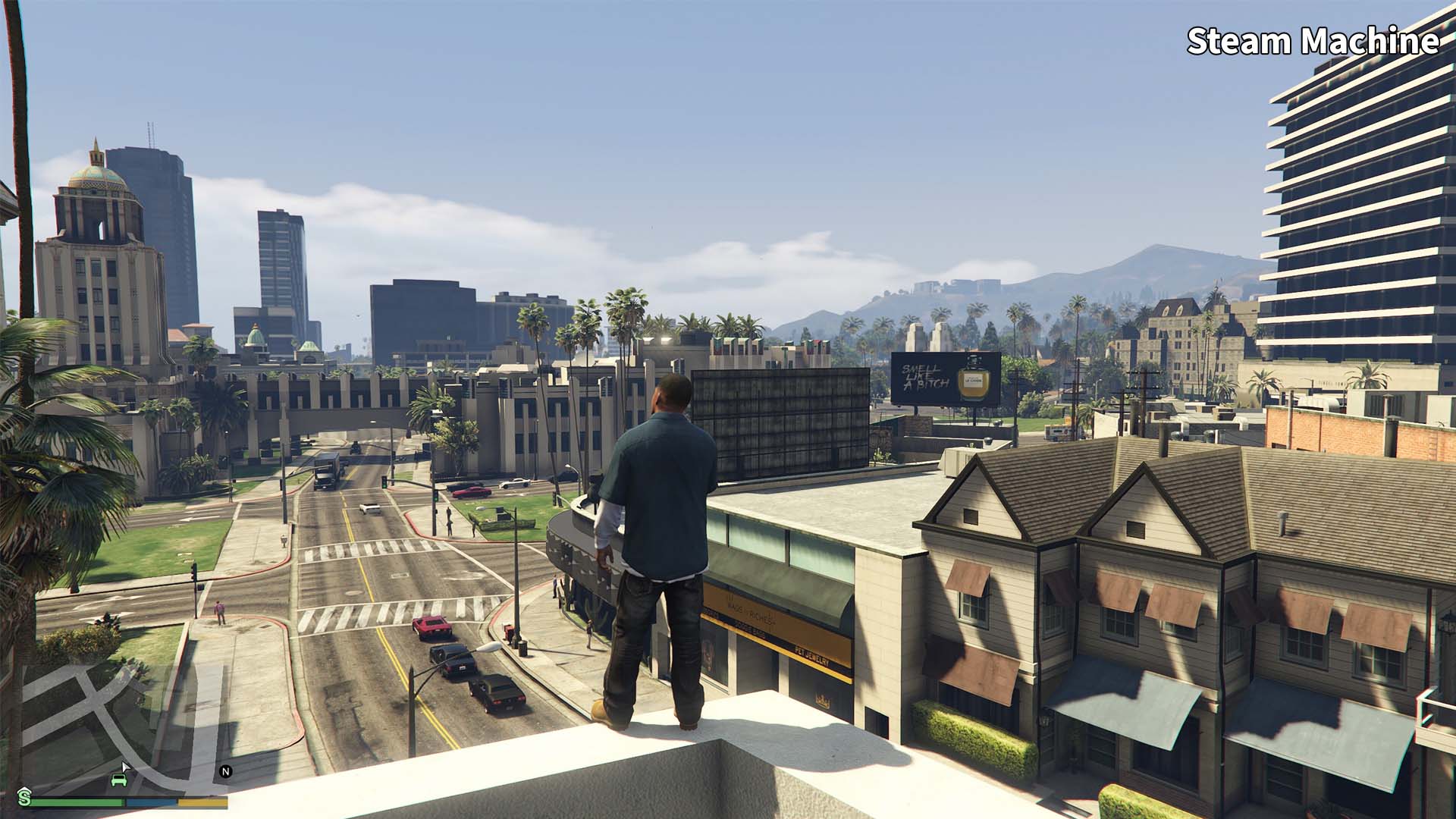
A very messy setup involving the Rockstar Launcher and using the Steam Machine’s built-in digital keyboard gave a bad first impression. But default settings are fine, and the game runs well. When I actually tuned up the visuals, it still ran great and looked sharp. PS5 Pro looks better in direct comparison thanks to RT support even at 60FPS, though you can mod GTA V on PC, which opens up a lot of cool options.
Gears of War Reloaded
As with some other games, the default settings when booting this up had it looking a bit blurry, but very playable. Upping some visual settings made the image sharper and didn’t wreck performance.
Fallout 4
Shocked that this big open-world RPG ran like a treat on Steam Machine with no tweaking. Turning things up didn’t impact the experience too much, though I didn’t explore some of the busier parts of the map, so it might not be a locked 60 FPS experience out in those areas.
Control Ultimate Edition
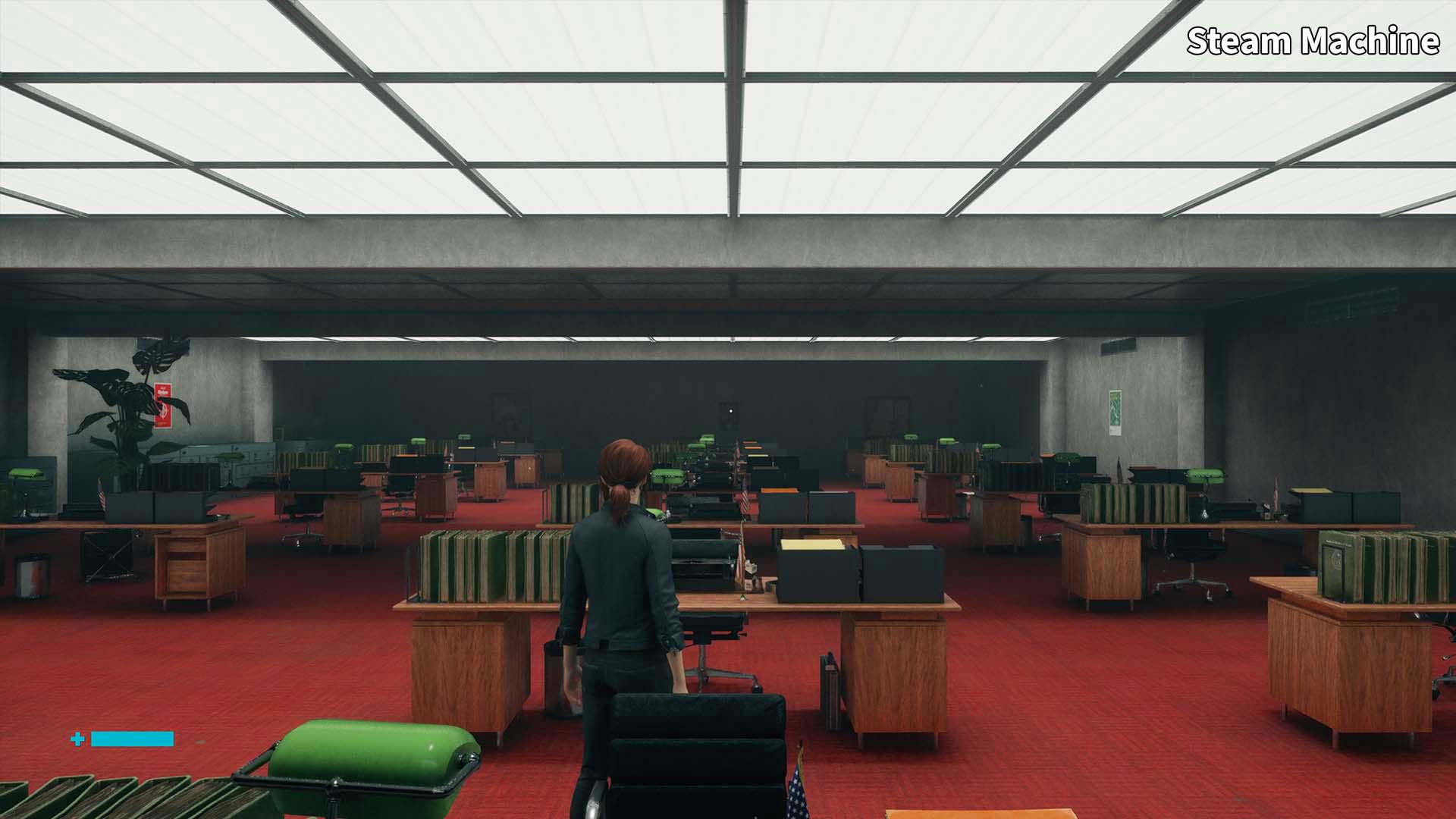
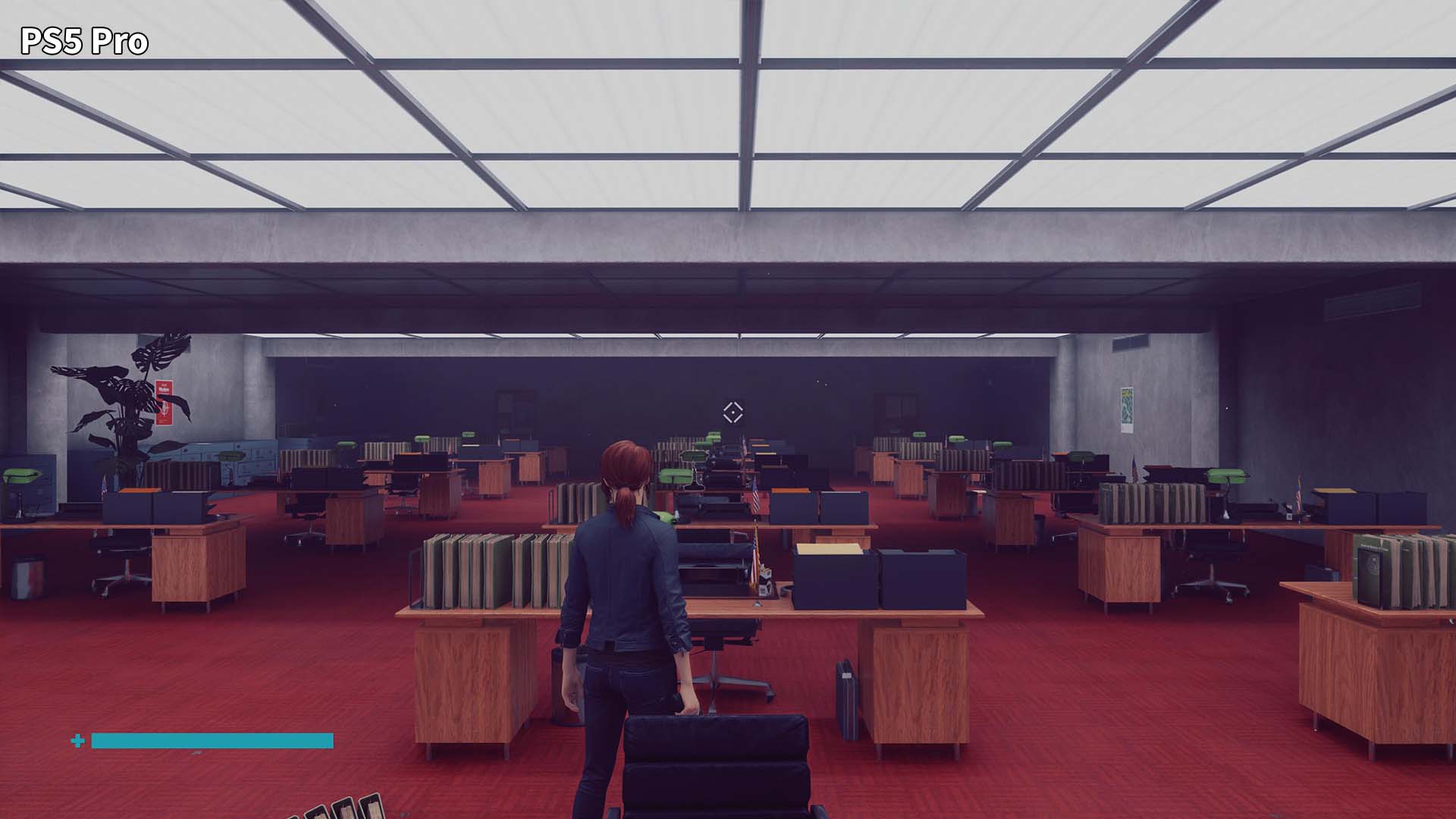
Ehhhh…While this wonderful third-person shooter looked fine enough on the smaller screen of the Steam Deck a few years ago, when blown up on a big 4K TV, the Steam Machine struggled. I had to turn settings down and ray-traced options off to get a mostly stable 60 FPS. Compared directly to the PS5 Pro version, it was interesting how close Steam Machine gets, but in motion, Sony’s machine was much better.
Arc Raiders
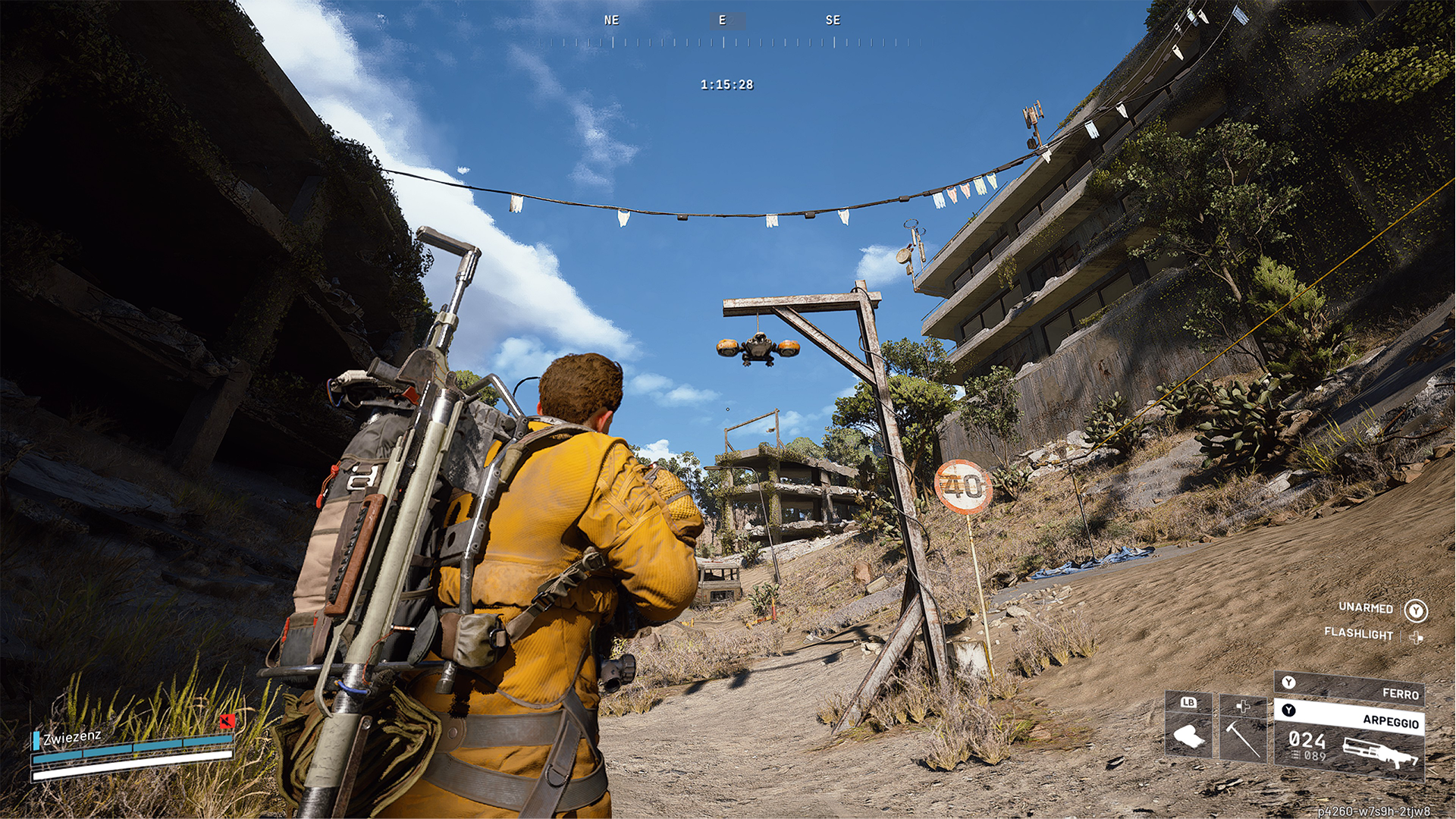
Perfectly playable right out of the box with solid visuals that held up well enough on my TV, but an image that was a bit fuzzy. You probably have better (and cheaper) ways to play this already, considering it was ported to consoles.
Elden Ring
I don’t like Elden Ring. But it does look nice on the Steam Machine right out of the box. Tweaking a few settings makes it look even nicer without making it run like shit. This was a great Steam Deck experience, and it turns in an even better performance on Steam Machine.
Vampire Crawlers
2D and 2.5D games just run so well on the Steam Machine. They also upscale quite nicely and look sharp on a TV. Vampire Crawlers is no exception and feels fantastic on a big TV with a Steam Controller.
Resident Evil 4 remake
The default settings for this provided a fine experience, but some fuzziness in the image was more noticeable than I expected. Tinkering and tuning up settings helped, but started to impact performance a bit. Very playable, but you’ll have to be okay with it not looking super sharp.

Ratchet & Clank: Rift Apart
Default settings had this platformer running very poorly. But with some tweaks I was able to get a mostly stable 60 with no ray-tracing and plenty of upscaling. It doesn’t look nearly as incredible as the PS5 version, but once I got everything dialed in, it was fine.
Helldivers 2
Like a number of other games, Helldivers 2 ran great on default settings, but was noticeably less sharp when compared to the game running on the same TV on PS5 Pro. But I still had a good time killing bugs and getting destroyed by teammates who can’t aim.
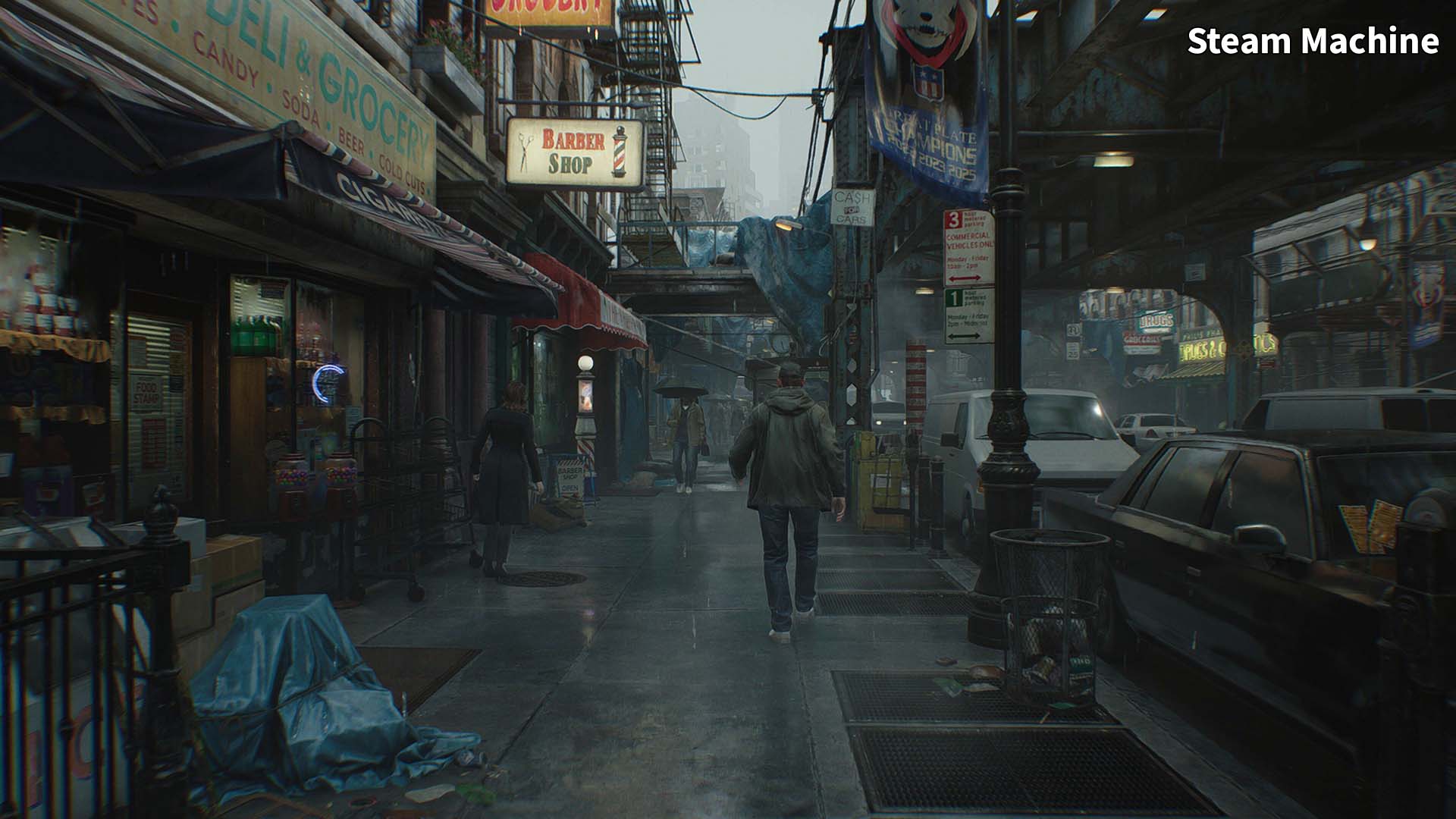
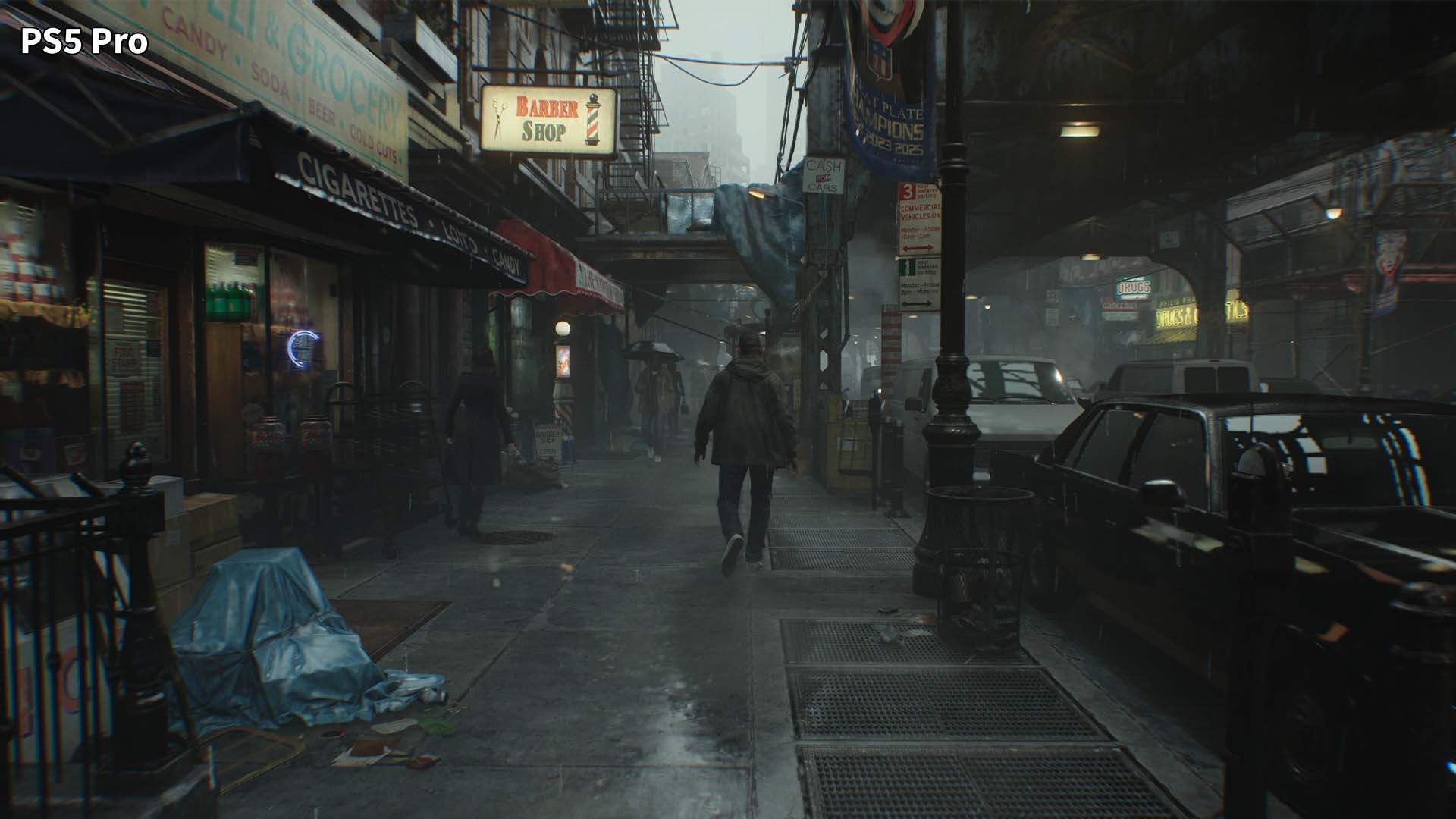
Resident Evil Requiem
If you look at it directly compared to the PS5 Pro, which you can see above, it becomes clear the Steam Machine is lacking. But on its own, Capcom’s horror game holds up well, plays great, and looks sharp enough to not distract me too much.
The Last of Us Part II Remastered
Another surprise. This game ran like butter on the Steam Machine and looked fine on default settings. Bumping up sliders a bit made it look even better. This was one of those experiences that really sold me on the Steam Machine as it felt very console-like. I hit a button and a big, graphically advanced game started playing and looked nice. Shame this thing is $1,000 because moments like this make the tiny, super quiet Steam Machine feel magical.
Peak
I had not really played this co-op climbing game until I booted it up on the Steam Machine to play with my wife. And it worked flawlessly on Steam Machine. Never messed with a single setting. It just booted up, and I played it fine. My wife, running Peak on my high-end PC, turned around a few times and didn’t catch a difference between my version and her version. I’m not surprised this runs so well on Steam Machine, and having an easy way to play this in the same room now is awesome.

Warhammer 40K: Darktide
Default settings weren’t great, with the game hovering in the mid-40s. I was able to tweak some things, namely turning on FSR and lowering the overall visual settings to medium, to get a mostly stable 60FPS. But I have this on PS5 and will play it there instead.
Halo: Master Chief Collection
I have no idea how this runs on a Steam Machine because the game popped up a box asking me to log in to my Xbox account but wouldn’t recognize the Steam Machine’s digital keyboard. I clicked around for a few minutes, but couldn’t get this one to work. Maybe if I plugged a mouse in or something, but as an out-of-the-box experience, Halo MCC fails.

Tiny Terry’s Turbo Trip
These are the kinds of games that I’m excited to play on Steam Machine in the future. Indie games that use retro-inspired visuals to create vibrant 3D worlds that don’t push systems very hard. Turbo Trip is a fantastic game, and playing it on a Steam Machine with max settings at 60FPS was no problem. Perfect experience. Great game. Check it out.
Rage
And finally, just for fun, I booted up id Software’s Rage, a somewhat underrated open-world FPS that was famous for being able to run on nearly anything, even back in the day. And despite Steam warning me that Rage won’t work on the Steam Machine, it did, though I had to use mouse mode on the Steam Controller to tinker with settings to get the gamepad working. Once I did that, I was hanging out with virtual John Goodman and blasting mutants with no trouble. If you can deal with some tinkering, the Steam Machine is great for playing older PC games on the couch.
The end result of all this testing? Well, I think the Steam Machine is a really cool piece of gaming hardware that is too expensive to recommend to anyone other than the most dedicated tinkerers or people desperate for a very easy, super tiny, and quiet way to play most Steam games on their big living-room TV.
If you have a huge library of Steam games, many of which are older or 2D or 2.5D, and you want an easy way to play them on your TV, the Steam Machine is an option. But at this price point, you could save some money and buy a cheaper, bigger pre-built PC. And for non-PC gamers, the Steam Machine is likely a tough sell, especially because come November, it won’t be able to play Grand Theft Auto 6 while a used Series S will. For many, that game will likely be a big reason to skip the Steam Machine and go with a console instead. So I’m not really sure who this is for beyond people with money to burn.
Now if this thing had shipped like a year or two ago and was around $700, we’d be having a very different conversation. But as it stands right now, the $1,000 Steam Machine seems like it will be a far more niche product than the Steam Deck and one which I’m not sure I’d recommend to most folks reading this.