




Close Menu
Best in Gaming
  • Home
  • News
  • PC Games
  • PlayStation
  • Xbox
  • Nintendo
  • Mobile
  • Editor’s Picks
  • Press Release
What's On
GTA 6 Has An Impressive Number Of Accessibility Options To Make The Game Less Frustrating

GTA 6 Has An Impressive Number Of Accessibility Options To Make The Game Less Frustrating

20 November 2026
GTA 6 Review-Bombed On Metacritic Over ‘Woke’ Story

GTA 6 Review-Bombed On Metacritic Over ‘Woke’ Story

20 November 2026
8 Amazing Indie Games We Think You Should Go Play

8 Amazing Indie Games We Think You Should Go Play

20 November 2026
What Can’t You Do In GTA 6?

What Can’t You Do In GTA 6?

20 November 2026
So Is The 0 GTA 6 Ultimate Edition Actually Worth It?

So Is The $100 GTA 6 Ultimate Edition Actually Worth It?

20 November 2026
Facebook X (Twitter) Instagram
Best in Gaming
  • Home
  • News
  • PC Games
  • PlayStation
  • Xbox
  • Nintendo
  • Mobile
  • Editor’s Picks
  • Press Release
Best in Gaming
Home » GTA 6 Has An Impressive Number Of Accessibility Options To Make The Game Less Frustrating
News

GTA 6 Has An Impressive Number Of Accessibility Options To Make The Game Less Frustrating

News RoomBy News Room20 November 20263 Mins Read
Facebook Twitter Pinterest LinkedIn Tumblr Email
GTA 6 Has An Impressive Number Of Accessibility Options To Make The Game Less Frustrating

With Grand Theft Auto 6 casting such a wide cultural net, a lot of people of varying levels of video game experience and skill are going to be playing it, some of whom maybe just want to sightsee or experience the story, and they may find a lot of the friction frustrating. Those people might quickly find themselves on the verge of giving up, but luckily, there are accessibility options built into the game that can be used right from the start.

Accessibility options are different from cheats, in that they don’t require you to beat the game or perform specific tasks to unlock them. They’re there for people who, for whatever reason, aren’t able to make progress with the game when playing the game with its standard difficulty, mechanics, or controls. Be warned that messing with some of these options can significantly alter the balance, and thus your enjoyment, of the game.

Also, unlike cheats, accessibility options do not disable trophies or achievements, nor do they prevent you from saving.

How to access GTA 6’s accessibility options

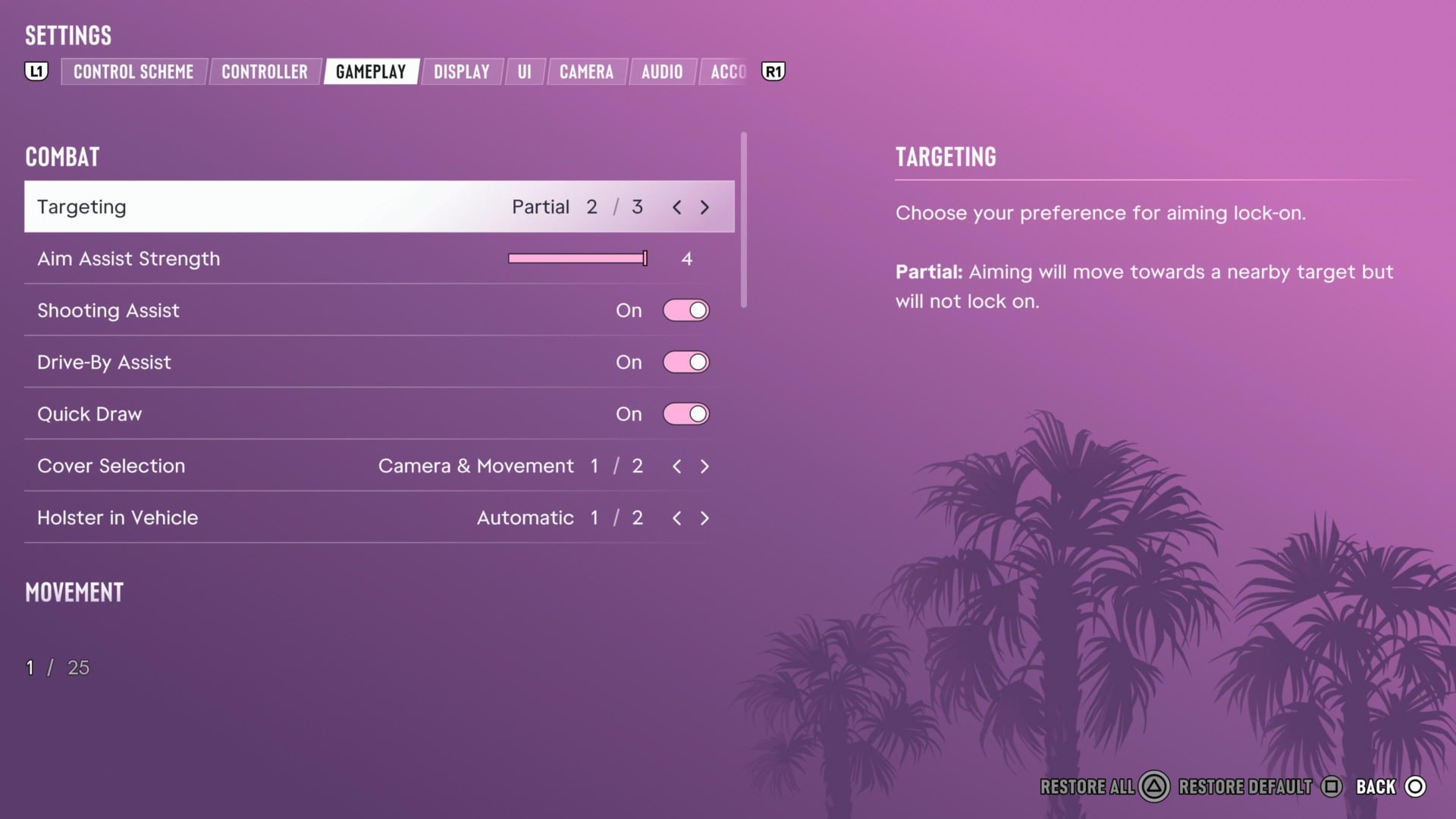
At any point in the game, access the pause menu and scroll all the way down to settings.

©Rockstar Games / Kotaku

Select that option and press RB or R1 to reach the Gameplay section.
Grand Theft Auto Vi 20261120132519
©

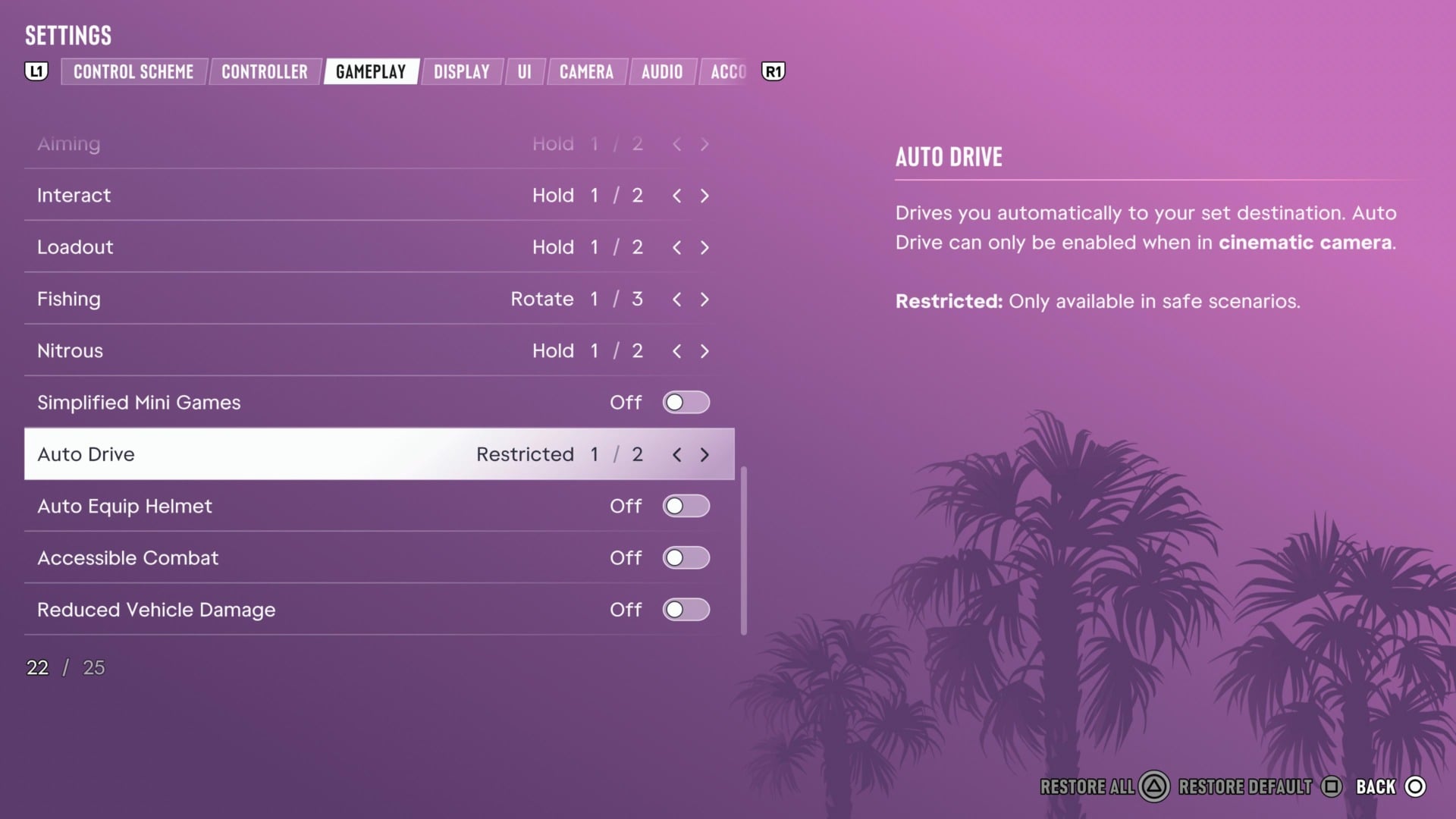
From here, scroll down to the bottom under “Accessibility” to see multiple options. The ones you’ll probably most want to pay attention to are those for Simplified Mini Games, Auto Drive, Accessible Combat, and Reduced Vehicle Damage.

Activating “Simplified Mini Games” makes activities like exercising, hotwiring vehicles, and shooting hoops easier and not so reliant on timing or easing off the analog triggers. 

Auto Drive is an option with its own sub-options, allowing you to have the game drive for you in leisurely situations like getting to a mission or, if you set it to Unrestricted, use it even when you’re being pursued or chasing enemies. The menu warns that the driving AI may still crash into objects or other cars, so it’s not like a free pass for everything to go perfectly.
Grand Theft Auto Vi 20261120132549
©Rockstar Games / Kotaku

The two big ones, Accessible Combat and Reduced Vehicle Damage, get their own warnings: The game was not built with this in mind. That means you can turn them on, but things will become significantly easier. If you activate these options without needing them, you may start getting bored playing GTA 6.

Accessible Combat reduces enemy health and also damage done to the player, so you’ll hurt them more and they will hurt you less. Reduced Vehicle Damage means your car won’t suffer too much in collisions or shootouts, so a T-Bone or two won’t render your car inoperable.

There are other accessibility options that make certain things like boosting while driving a little friendlier. If you ever have a problem controlling something in the game, it’s worth checking to see if there’s an accessibility option that would change how it works a little bit. Whatever helps you get through the game!

Share. Facebook Twitter Pinterest LinkedIn Tumblr Email

Related News

GTA 6 Review-Bombed On Metacritic Over ‘Woke’ Story

GTA 6 Review-Bombed On Metacritic Over ‘Woke’ Story

20 November 2026
8 Amazing Indie Games We Think You Should Go Play

8 Amazing Indie Games We Think You Should Go Play

20 November 2026
So Is The 0 GTA 6 Ultimate Edition Actually Worth It?

So Is The $100 GTA 6 Ultimate Edition Actually Worth It?

20 November 2026
GTA 6 Players Captivated By Mandy Apparently Include A Former Nintendo President

GTA 6 Players Captivated By Mandy Apparently Include A Former Nintendo President

20 November 2026
Editors Picks
GTA 6 Review-Bombed On Metacritic Over ‘Woke’ Story

GTA 6 Review-Bombed On Metacritic Over ‘Woke’ Story

20 November 2026
8 Amazing Indie Games We Think You Should Go Play

8 Amazing Indie Games We Think You Should Go Play

20 November 2026
What Can’t You Do In GTA 6?

What Can’t You Do In GTA 6?

20 November 2026
So Is The 0 GTA 6 Ultimate Edition Actually Worth It?

So Is The $100 GTA 6 Ultimate Edition Actually Worth It?

20 November 2026
Top Articles
GTA 6 Players Captivated By Mandy Apparently Include A Former Nintendo President News

GTA 6 Players Captivated By Mandy Apparently Include A Former Nintendo President

By News Room
Here Are Some Super Useful Control Shortcuts GTA 6 Doesn’t Tell You About News

Here Are Some Super Useful Control Shortcuts GTA 6 Doesn’t Tell You About

By News Room
Grand Theft Auto 6 Won’t Lead to Real Life Crimes, But Police Don’t Know That News

Grand Theft Auto 6 Won’t Lead to Real Life Crimes, But Police Don’t Know That

By News Room
Best in Gaming
Facebook X (Twitter) Instagram Pinterest Vimeo YouTube
  • Privacy Policy
  • Terms of use
  • Advertise
  • Contact Us
© 2026 Best in Gaming. All Rights Reserved.

Type above and press Enter to search. Press Esc to cancel.