
Close Menu
Best in Gaming
  • Home
  • News
  • PC Games
  • PlayStation
  • Xbox
  • Nintendo
  • Mobile
  • Editor’s Picks
  • Press Release
What's On
Take-Two Addresses the Future of GTA Online After GTA 6

Take-Two Addresses the Future of GTA Online After GTA 6

4 February 2026
Epic Isn't Chasing Steam's Crown, It's Sharing The PC Gaming Kingdom

Epic Isn't Chasing Steam's Crown, It's Sharing The PC Gaming Kingdom

4 February 2026
AirPods 4 Just Became the Most Affordable Entry in Apple’s Earbuds Lineup After a Surprise Price Drop

AirPods 4 Just Became the Most Affordable Entry in Apple’s Earbuds Lineup After a Surprise Price Drop

4 February 2026
Nintendo Switch 2 Is Killing It But Still In Need Of A Mega Hit

Nintendo Switch 2 Is Killing It But Still In Need Of A Mega Hit

4 February 2026
Next-Gen Xbox Console’s Launch Window Potentially Revealed

Next-Gen Xbox Console’s Launch Window Potentially Revealed

4 February 2026
Facebook X (Twitter) Instagram
Best in Gaming
  • Home
  • News
  • PC Games
  • PlayStation
  • Xbox
  • Nintendo
  • Mobile
  • Editor’s Picks
  • Press Release
Best in Gaming
Home » How to Change Your Hair in Heartopia
Mobile

How to Change Your Hair in Heartopia

News RoomBy News Room8 January 20263 Mins Read
Facebook Twitter Pinterest LinkedIn Tumblr Email
How to Change Your Hair in Heartopia

Heartopia allows players to fully customize their character when they first start the game. However, they might’ve grown tired of their choice, accidentally clicked on the wrong one, or they may just want to explore their options.

7 Best Mobile Games Like The Sims

Players who can’t get enough of The Sims will find that the following mobile games scratch a similar itch.

This guide tells players everything they need to know about hairstyle customization in Heartopia, including where gamers can change it, how they can get access to more hairdos, and how to style them according to their color preferences.

Where to Change Your Hair in Heartopia

Heartopia Salon Location

heartopia where to change hair

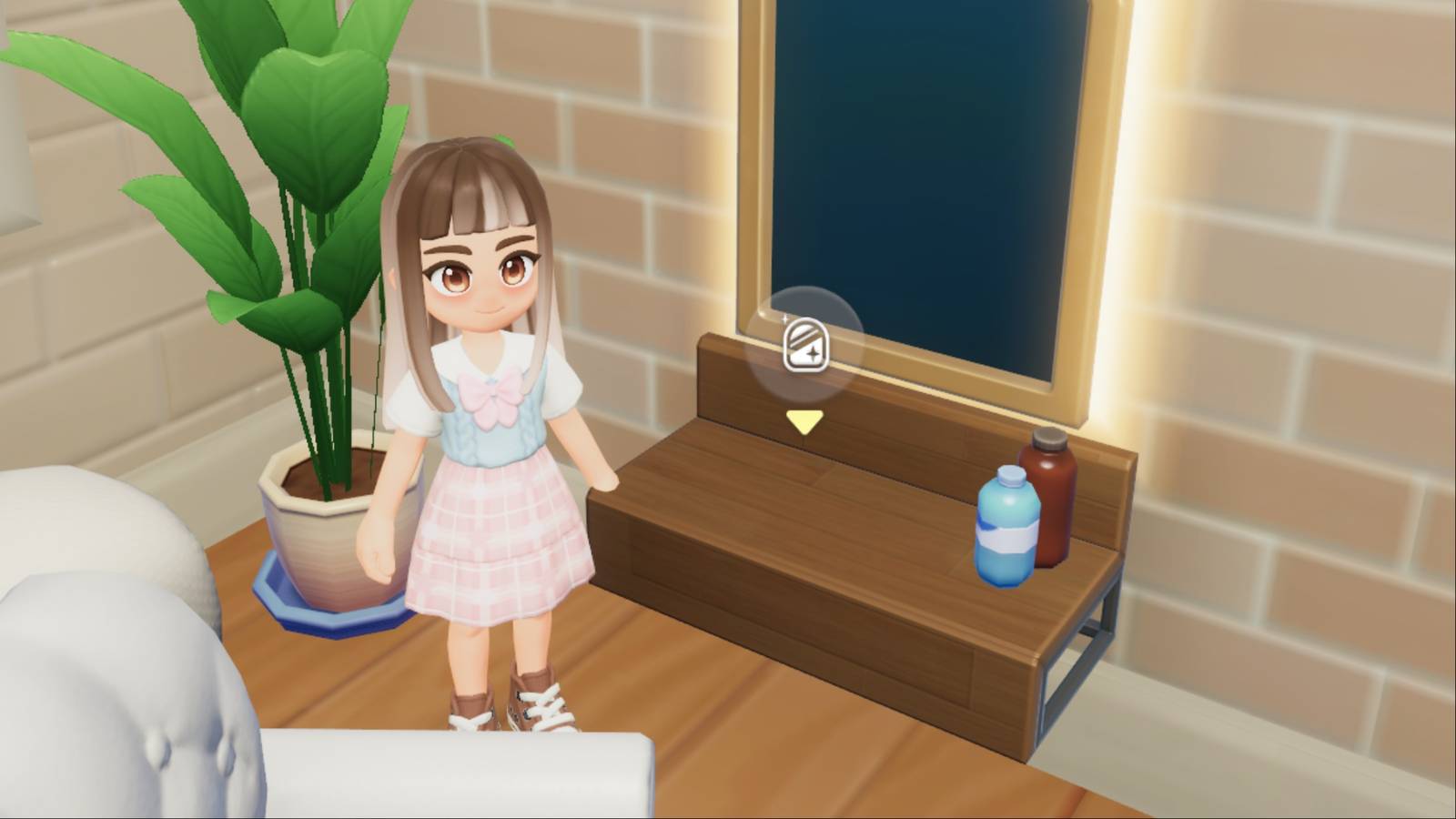
Players cannot change their hairstyle at home, even after unlocking the wardrobe – this is done at the salon. To visit the hair salon and change their hair in Heartopia, players have to enter Morin’s Clothing Store near the Central Square and go up to the second floor.

Here, they will find vanities with all sorts of hair products on them. Players must interact with the vanity’s mirror to change their hair in Heartopia.

How to Customize Your Hair in Heartopia

Players can customize their hair by selecting the Hairstyle tab at the salon. Here, they can pick and unlock new hairstyles if they have enough Wishing Stars or Gold in their inventory. If not, they might want to activate some Heartopia codes to easily gain access to some of these resources for free.

Once players have selected a hair that they like, they can click on the eyedropper tool to change its primary and secondary color. This will allow them to apply highlights and customize their hair to meet their preferences. Some colors are locked, and players will have to increase their D.G. Member level to unlock them.

How to Get More Hairstyles in Heartopia

There are dozens of hairstyle choices in Heartopia, but not all of them are available from the get-go. Players will have to work hard to get their hands on some of the coolest hairstyles available.

Gamers will progressively unlock hairstyles as they rank up their D.G. Member status. Every two levels, from Level 4 until Level 10, they will gain access to more hairstyles as well as their variants. The same goes for gaining access to all hairstyle color variants – players will unlock more colors as they get closer to Level 10. Once they’ve unlocked a D.G. Member hairstyle, they can purchase it to gain access to it.

If players keep scrolling down the hairstyles page, they will come across styles that can only be unlocked for 30 Wishing Stars.

Lastly, there are premium hairstyles that players will only gain access to if they get them through the Gilded Acorn Exhibition. They must select an exhibition that they like, and then click Draw to spend Exhibition Pass tickets and receive a random reward from the set.



Heartopia Tag Page Cover Art

Systems

PC-1

phone transparent


Released

January 8, 2026

Developer(s)

XD

Publisher(s)

XD

Number of Players

Single-player

Steam Deck Compatibility

Unknown


Share. Facebook Twitter Pinterest LinkedIn Tumblr Email

Related News

Skullgirls Codes (February 2026)

Skullgirls Codes (February 2026)

3 February 2026
Stardew Valley Players Still Haven’t Found the Game’s Last Big Secret

Stardew Valley Players Still Haven’t Found the Game’s Last Big Secret

3 February 2026
Stardew Valley Creator Teases New Features Coming in the 1.7 Update

Stardew Valley Creator Teases New Features Coming in the 1.7 Update

3 February 2026
Stardew Valley Dev Gives Update on Haunted Chocolatier Progress

Stardew Valley Dev Gives Update on Haunted Chocolatier Progress

3 February 2026
Editors Picks
Epic Isn't Chasing Steam's Crown, It's Sharing The PC Gaming Kingdom

Epic Isn't Chasing Steam's Crown, It's Sharing The PC Gaming Kingdom

4 February 2026
AirPods 4 Just Became the Most Affordable Entry in Apple’s Earbuds Lineup After a Surprise Price Drop

AirPods 4 Just Became the Most Affordable Entry in Apple’s Earbuds Lineup After a Surprise Price Drop

4 February 2026
Nintendo Switch 2 Is Killing It But Still In Need Of A Mega Hit

Nintendo Switch 2 Is Killing It But Still In Need Of A Mega Hit

4 February 2026
Next-Gen Xbox Console’s Launch Window Potentially Revealed

Next-Gen Xbox Console’s Launch Window Potentially Revealed

4 February 2026
Top Articles
Borderlands 4 Nintendo Switch 2 Release Put on Hold by Take-Two PC Games

Borderlands 4 Nintendo Switch 2 Release Put on Hold by Take-Two

By News Room
The Best Retro Gaming Handheld Maker Around Takes On The Vita News

The Best Retro Gaming Handheld Maker Around Takes On The Vita

By News Room
Baldur’s Gate 3 Gets More Magic: The Gathering Cards News

Baldur’s Gate 3 Gets More Magic: The Gathering Cards

By News Room
Best in Gaming
Facebook X (Twitter) Instagram Pinterest Vimeo YouTube
  • Privacy Policy
  • Terms of use
  • Advertise
  • Contact Us
© 2026 Best in Gaming. All Rights Reserved.

Type above and press Enter to search. Press Esc to cancel.